
Lead Routing to Tradespeople
The right trade, the right postal code, without an email blast
The tradespeople lead problem
Manufacturers of building products, coatings, flooring, conservatory systems, or timber-construction solutions generate thousands of end-customer inquiries a year through marketing campaigns, and need to hand them off to a network of local trade shops. The problem isn’t lead volume. The problem is the receiving side: most trade shops are small (1–5 people), don’t use a CRM, are on a job site rather than at a desk, and depending on the cycle are booked out 4–12 weeks ahead.
A lead that arrives as an email to a shop’s info@-address either lands in the spam filter or buried under 50 other messages. Even a good shop calls back after three days, if at all. The result: poor conversion rates, frustrated end customers, frustrated contractors, and no traceable marketing ROI on the manufacturer side.
Three things that make trades routing different
- Capacity scarcity is the default, not the exception. The bottleneck is availability, not interest. leadtributor does not solve this with a central capacity database; it routes through partner acceptance decisions: an overloaded shop declines with one click, the system routes to the next shop automatically. With enough escalation stages, the lead reaches an available recipient within minutes.
- Mobile + phone, not desktop + email. Tradespeople work outdoors, not at a PC. Acceptance, status updates, and call-backs must be doable in 10 seconds on the phone, one-handed, with a UI that survives work gloves.
- Pre-qualification prevents frustration. Forwarding a DIY-grade inquiry to a serious painter, or a roofing inquiry to a flooring shop, burns trust fast. Lead data has to be plausibility-checked before routing, otherwise partner acceptance collapses.
Requirements and how leadtributor solves them
| Requirement | leadtributor solution |
|---|---|
| Capacity governed by partners | Accept or decline-with-reason (capacity, specialization, location, spam); on decline, leadtributor routes immediately to the next shop. Partners decide per inquiry |
| Smartphone-first for the job site | leadtributor portal as a PWA: any device, no app-store install. Accept-by-tap, status-set in two taps, tap on the phone number opens the device’s phone app. |
| Inquiry pre-qualification | Required fields in the web form, optional manual QA step before routing, automated spam/junk filter |
| Auto follow-up on non-acceptance | Defined response window; on lapse, auto-reassign to the next shop plus escalation push |
| Specialization match | Tags per shop (renovation/new build, niches) are matched against inquiry context |
| Reporting per region and shop | Response time, acceptance rate, conversion, order value: per shop, per postal code, per inquiry source |
How this differs from Aroundhome, MyHammer, or similar lead platforms
Third-party platforms are often more of a problem than a solution from the manufacturer’s point of view: they tie the end-customer relationship to themselves, take a commission per lead they route, and control the data flow. The manufacturer loses the brand experience exactly where the customer is building trust.
leadtributor is deliberately the opposite: your brand, your lead stream, your contractor network. The software handles distribution and tracking only: no commission per lead, no lock-in, no platform competition for your customer.
Which industries benefit most
Manufacturers with locally-installed end products: coatings and paint (Brillux, Caparol, Sto), flooring (Egger, Parador), timber construction, roofing systems (Velux, Braas, Creaton), conservatories and sun shading (Solarlux, weinor), awnings, carports, stucco and drywall systems. In short: anywhere the end-customer inquiry happens in postal-code X and a local trade shop installs, attaches, or lays the product.
Next step
See in 30 minutes how leadtributor would look in your setup: with your postal-code areas, your product categories, your specializations, and your contractor network.
How it works
- Step 1
Connect your inquiry sources
Brand website forms, performance-campaign landing pages, phone hotlines (with click-to-call), trade-show capture. Every end-customer inquiry lands in leadtributor in a structured format. Required form fields filter spam and unclear inquiries at the front door.
- Step 2
Define routing rules, optional manual pre-qualification
Postal-code area as a hard condition, specialization as a match criterion (painter vs. roofer), inquiry-type filter (renovation vs. new build, B2B vs. B2C), language, and other tags per contractor. Optionally the vendor's back-office reviews each incoming lead manually (for sensitive large projects or unclear inquiry quality) and releases only the qualified ones into distribution.
- Step 3
Lead arrives on the smartphone
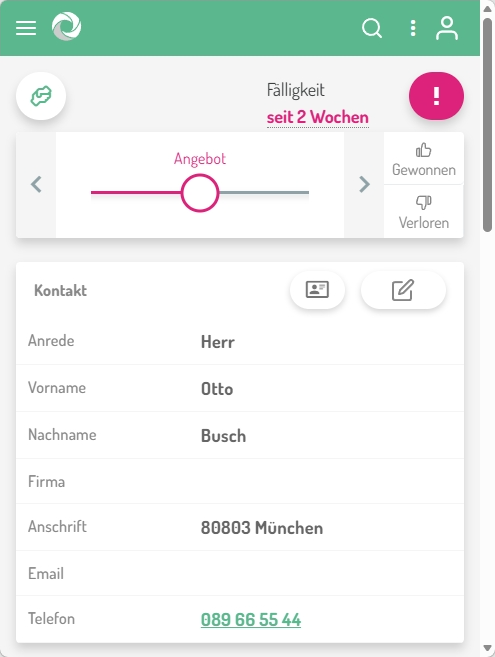
The contractor sees the lead in the leadtributor portal (a PWA on any smartphone or tablet, no app-store install) with context, location, and a tap-link on the customer's number that opens the device's phone app. No PC login required, one-hand operation on the job site.
- Step 4
Accept or 'Not this week'
Two buttons: accept or decline with reason (capacity, specialization, location, spam). On decline, leadtributor routes within seconds to the next suitable shop. Same mechanism on non-response after 24 hours. No lead goes cold.
- Step 5
Appointment, quote, close, full visibility
The contractor documents first contact, on-site appointment, quote, close or loss inside the portal. You see per region, per shop, per inquiry source: response time, acceptance rate, conversion to order, average order value.
Frequently asked questions
How do I prevent a lead from landing with an overloaded contractor?
Capacity is governed by the partner's acceptance decision, not by a central capacity database in the system. Concretely: leadtributor offers the lead in escalation stages. If the first shop declines for capacity reasons (one click, with reason), the system routes within seconds to the next suitable shop. If a partner does not respond within the window, the next escalation stage runs automatically.
What happens if a contractor doesn't pick up the phone or doesn't respond?
You define a response window, typically 24 or 48 hours. If the lead isn't accepted in that window, leadtributor auto-routes it to the next contractor. Optionally an escalation push notification fires beforehand. No lead is lost.
Can contractors accept the lead from a smartphone, even on the job site?
Yes. The leadtributor portal is a PWA that runs on any smartphone or tablet without an app-store install. Accept-by-tap, tap on the customer's number opens the device's phone app, status-set in two taps. One-hand operation, no PC required.
How does routing work when my contractors have different specializations?
Each shop carries specialization tags in setup (e.g. interior fit-out, exterior facade, renovation, new build, large projects). On lead arrival those tags are matched against the inquiry context: a conservatory lead won't go to a drywall specialist.
How can I filter lead quality up front so contractors only see serious inquiries?
Three levers: hard required fields in the web form (full name, phone, postal code, project type), an optional pre-qualification step by the manufacturer's back-office before routing, and an automated spam/junk filter. Result: contractors only see inquiries worth working.
How is this different from lead platforms like Aroundhome or MyHammer?
Third-party platforms bind the end-customer relationship to themselves, take a commission per lead, and control the data flow. With leadtributor the lead stream stays in your brand: you generate the inquiry through your website and marketing channels and route to your own contractor network. No commission, no platform lock-in, no third-party competition for the customer.
How do I onboard smaller contractor shops that don't have their own CRM?
The partner portal is built exactly for this audience. The shop only needs a smartphone and a browser login: no CRM of their own, no integrations, no IT investment. Acceptance, status updates, and documentation all happen inside the portal.
Lead Routing to Tradespeople
Request a demo