
Lead Routing to Specialist Dealers
From a click on your brand site to the specialist dealer on the ground
The specialist-dealer reality
Manufacturers selling through a specialist-dealer channel (agricultural machinery, consumer electronics, industrial equipment, hearing aids and eyewear, sport and outdoor brands, furniture) generate consumer and business inquiries through their brand website, configurators, product detail pages, and trade shows. Those inquiries have to land with the right specialist dealer further down the distribution chain. “The right dealer” means: stocks the matching portfolio, sits within a reasonable distance of the customer, fits the inquiry type (B2C individual purchase vs B2B volume vs maintenance request).
The difference to a B2B software reseller channel: specialist-dealer inquiries are more transactional. Cycles run days to weeks rather than months, inquiry volume is higher, advice time per lead is shorter. That does not mean the requirements are easier. Portfolio diversity and the store-vs-online hybrid make routing non-trivial.
Three things that set specialist-dealer routing apart
- Portfolio match is the core routing criterion. A lead has to reach a dealer who stocks the product asked about, not just the nearest location. Manufacturer portfolios are heterogeneous, dealer portfolios even more so; without tag-based match logic, leads land with dealers who don’t offer the product at all.
- Lead recycling is the standard, not the edge case. At specialist-dealer volume, dealers regularly decline: capacity, portfolio, regional specifics. Distribution has to treat that decline as a normal workflow step and route within seconds to the next matching dealer, not as an exception escalation.
- B2C and B2B in one platform. Consumer inquiries (private purchase) and business inquiries (commercial, volume order, maintenance contract) need different routing rules and possibly different required fields. The tool has to support both in parallel without forcing the manufacturer’s back-office to maintain duplicate setups.”
Requirements and how leadtributor solves them
| Requirement | leadtributor solution |
|---|---|
| Portfolio match in routing | Tag-based dealer classification (product groups, brands, B2C/B2B); routing rules match tags against lead context |
| Store / online hybrid | Store / online as a partner tag; routing can prioritise proximity for local inquiries or shipping-friendliness for nationwide ones |
| Lead recycling on decline | Decline-with-reason triggers automatic routing to the next matching dealer within seconds |
| B2C + B2B in parallel | Inquiry type as a routing criterion, type-specific required fields |
| Optional pre-qualification | Manufacturer back-office can review incoming leads before distribution, useful for large-account inquiries or unclear quality |
| Campaign tracking | Custom fields on the lead (campaign ID, promotion, UTM); export via public API for BI analysis of ROI per campaign and dealer |
| Reporting | Per dealer / region / portfolio: acceptance rate, response time, conversion, order value |
How this differs from reseller sales
Reseller sales (B2B software, IT hardware resellers) has long sales cycles with multiple stakeholders and complex technical validation. Specialist-dealer sales is more transactional: faster cycles, higher inquiry volume, fewer formal approval processes, but more diversity in portfolio and sales formats.
In practical terms for leadtributor: the same routing and reporting engine, different configuration. In dealer setups the leverage is in clean portfolio tagging and lead-recycling logic; in reseller setups it sits in long cycle stages and escalation windows before acceptance.
Which industries benefit most
Manufacturers with a tiered specialist-dealer channel: agricultural and farming machinery (Kverneland-style, with regional dealers for different machinery categories), consumer electronics (hi-fi, photo, IT hardware), industrial equipment and tools, hearing aids and eyewear (premium brands through authorised specialist retail), sport and outdoor brands, furniture and home. Anywhere a branded manufacturer sells through regional or specialised dealers who deliver portfolio depth and customer advice on the shop floor.
Next step
See in 30 minutes how leadtributor would look against your specialist-dealer channel: with your product portfolio categories, your dealer network, your B2C/B2B inquiry types, and the connection to your seasonal marketing campaigns.
How it works
- Step 1
Aggregate inquiry sources from brand marketing
Manufacturer site with dealer finder, product detail pages with a 'Where to buy' CTA, configurator submissions, campaign capture, trade-show forms. Every inquiry lands in leadtributor as a structured lead, with product context, region, and inquiry type (B2C purchase vs B2B volume) already attached.
- Step 2
Route by portfolio, region, and inquiry type
Specialist dealers carry portfolio tags (which product groups do they stock? which brands? store, online, or both?). Routing rules use those tags together with postal-code area and inquiry context to pick the matching dealer. Optionally the manufacturer's back-office reviews the lead manually before routing, useful for large-account inquiries.
- Step 3
Lead arrives with full product context
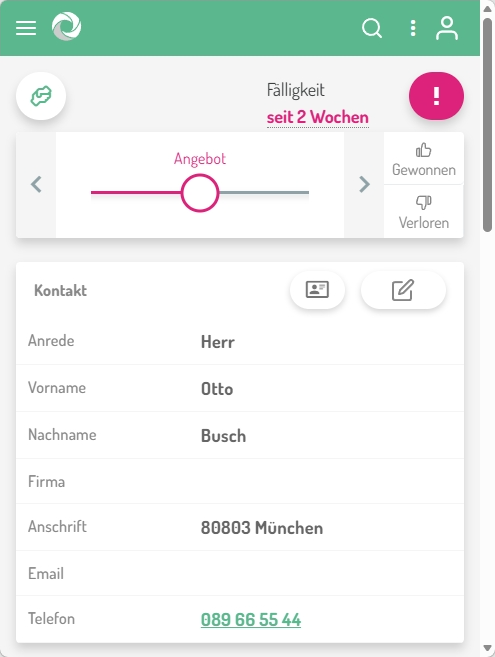
The dealer sees the lead in the leadtributor portal: a PWA that runs on any device, no app-store install, with customer intent, product configuration, variant choice if any, source, and marketing campaign ID. Enough context to advise the customer, not an isolated 'please call back' ticket.
- Step 4
Accept, advise, sell or lead recycling
The dealer accepts or declines with a reason (portfolio mismatch, location, capacity). On decline, leadtributor routes within seconds to the next suitable dealer. Lead recycling prevents an inquiry from sitting idle when a dealer can't or won't take it. On non-response, the escalation runs automatically.
- Step 5
Order, campaign ROI, reporting
Per dealer, per region, per campaign: acceptance rate, response time, conversion to sale, order value. Campaign-specific lead sources carry custom fields (campaign ID, promotion tag) on the lead, exportable via the public API for your BI analysis per seasonal campaign.
Frequently asked questions
How does routing by product portfolio work?
Each specialist dealer carries portfolio tags in setup, the product groups or brand lines they stock. On lead arrival those tags are matched against product information attached to the lead (from the configurator, product detail page, or inquiry form). A heat-pump inquiry does not go to a dealer who only stocks solar modules, and vice versa.
Can we route B2C and B2B inquiries differently?
Yes. Inquiry type is its own routing criterion: B2C individual purchases can go to any dealer in the region; B2B volume inquiries only to dealers with a B2B tag or higher service level. Type-specific required fields are also supported (e.g. revenue estimate on B2B forms).
What happens if a dealer declines an inquiry, is the lead lost?
No. On decline (with reason: portfolio, capacity, location, spam) leadtributor automatically routes to the next suitable dealer. Lead recycling is part of the escalation logic: as long as any matching dealer exists in the network, the lead reaches someone.
Does it work for online-only dealers without a physical store?
Yes. Store / online is a partner tag like any other; pure online dealers can be preferred for nationwide inquiries or shipping-friendly product categories. Local inquiries marked 'pickup only' go to in-region brick-and-mortar dealers.
Can we measure seasonal campaigns or marketing promotions per dealer?
Custom fields on the lead (campaign ID, promotion tag, UTM source) are captured at lead creation and persist with the lead. Through the public API you can export those values into your BI tool and build ROI analysis per campaign and per dealer there. A dedicated campaign-reporting dashboard inside the leadtributor UI is not available yet.
How do we distinguish high-value inquiries from junk?
Three levers: hard required fields in the web form (contact data, product interest, region), an optional manual pre-qualification step by the manufacturer's back-office before routing (useful for large accounts or unclear inquiry quality), and an automated spam filter.
Do dealers get enough context to actually advise the customer?
More than with plain email forwarding: the lead carries product configuration (from configurator sources), inquiry text, marketing source, and optional context fields. The dealer can also ask follow-up questions back to the manufacturer through the portal if technical clarification is needed.
Lead Routing to Specialist Dealers
Request a demo