
Lead Routing to Service Technicians
Service requests with full context, to the technician in the area
The service-technician reality
Manufacturers whose products are installed, maintained, and extended at the customer site run a service channel that often produces more inquiry volume than the original purchase business. Photovoltaic extensions, smart-home setup requests, alarm-tech maintenance, kitchen assembly appointments, machinery service after warranty. Most of those leads run through a network of service technicians or assembly teams that the manufacturer’s marketing does not steer directly.
The problem is not generating inquiries. The problem is distributing them with the right context: which technician has the service area, which specialization, which capacity? What equipment sits at the customer, what service history, what contract? Forwarding an inquiry as an email to service@… loses exactly that context, and the technician has to re-collect everything from the customer.
Three things that make service-technician routing different
- Service occasions dominate over new purchases. A large share of leads is repair, maintenance, or extension. The inquiry typically carries a serial number, a contract, or a service reason, so data that must persist on the lead, not just in a free-text field. Existing-customer routing differs from new-customer routing.
- Appointment lead time is part of the inquiry. Technicians plan days to weeks ahead; customers often enter a preferred appointment on the lead form. The tool has to carry that appointment as a date value (a custom field on the lead), even when actual booking happens elsewhere. leadtributor persists appointment data; it does not maintain a calendar itself.
- Mobile-first for the on-site visit. Service technicians work at the customer, not in the office. Acceptance, address-to-map, phone-number-to-call, service documentation: all from the smartphone browser without an app-store install.
Requirements and how leadtributor solves them
| Requirement | leadtributor solution |
|---|---|
| Routing by service area and specialization | Tag-based routing (postal-code ranges, equipment types, service level per technician) |
| Existing-customer vs new-customer distinction | Custom fields on the lead (serial number, contract ID, service history); routing can react accordingly |
| Preferred appointment in the lead | Appointment as a custom field on the lead; shown in the technician portal as a planning anchor; actual booking runs outside |
| Mobile-first for on-site work | PWA on any device, no app install; tel: link and maps link integrated |
| Escalation before acceptance, auto follow-up after | Configurable stages before acceptance; automated follow-up on activity gap after acceptance |
| Service-level differentiation (SLA) | Service-level tag on the lead and on the partner; routing and escalation rules can treat SLA tiers differently |
| Reporting | Per technician and region: response time, acceptance rate, conversion, share of existing vs new customers, average order size |
How this differs from the installer page
The installer page covers first-time installation: heating, sanitary, PV, heat pumps, electrical installation, smart home, security tech in the new-purchase context. The service-technician page sets a different focus: after-sales service, maintenance, extension, and assembly as recurring business with existing customers, plus pure assembly verticals (kitchens, furniture, machinery setup) that do not fit the first-time-install pattern. From a routing perspective the mechanics are the same (tags, escalation, auto follow-up, PWA portal); on the content side the focus is service context and existing-customer data.
Which industries benefit most
Manufacturers with a service channel via a technician network: photovoltaic manufacturers with service and extension business, smart-home brands with setup and reset service, security tech (alarms, access control, video, maintenance-heavy), furniture and kitchen brands with end-assembly service, machinery and plant manufacturers with on-site service, lift and conveyor manufacturers with maintenance contracts.
Next step
See in 30 minutes how leadtributor would look against your service channel: with your service areas, your equipment specializations, your contract tiers, and the connection to the inquiry channels through which your customers reach service.
How it works
- Step 1
Capture service and assembly inquiries in a structured format
Service forms on the manufacturer site, online configurators for extensions, phone hotlines, warranty portals, end-customer app submissions. Every inquiry lands in leadtributor with the needed context: equipment type, serial number or contract ID if existing customer, service occasion, preferred appointment as a custom field where supplied.
- Step 2
Route by service area, specialization, and service type
Service technicians in leadtributor carry tags: service area (postal-code ranges), equipment specialization (e.g. specific equipment types or brand lines), service level (maintenance contract, repair, extension). Routing rules match those tags against the inquiry context. Optionally the manufacturer's back-office reviews incoming inquiries manually (for safety-critical equipment or large-account service).
- Step 3
Lead arrives with equipment context
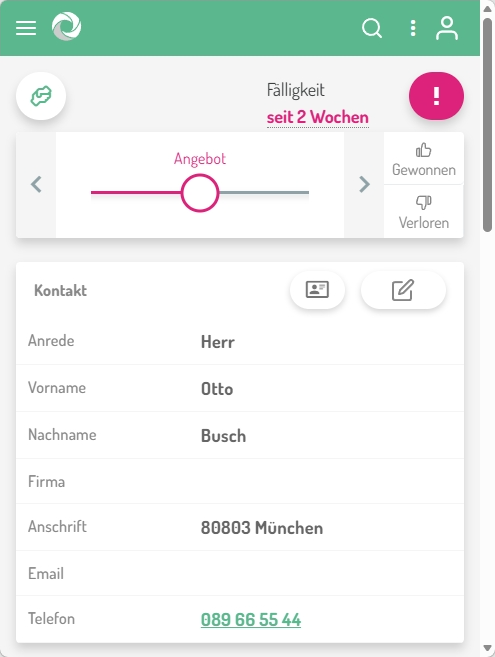
The technician sees the lead in the leadtributor portal (a PWA on any smartphone or tablet, no app-store install) with customer intent, equipment details, serial number and contract data when available, service history as custom fields. Tap on the phone number opens the device's phone app; tap on the address opens the device's maps app.
- Step 4
Acceptance, appointment coordination, service delivery
The technician accepts the lead or declines with a reason (service area, capacity, specialization). Appointment coordination with the customer happens afterwards over phone, email, or the technician's own calendar tool. leadtributor does not maintain a calendar itself, but persists the requested and agreed appointment as lead fields. On non-acceptance, escalation runs automatically.
- Step 5
Service close, follow-up leads, reporting
The technician documents the service visit in the portal: what was done, what follow-up maintenance is due, whether a follow-on order was created. Per technician, per region, per equipment type you see: response time, acceptance rate, conversion to service order, average order size, share of existing-customer vs new-customer inquiries.
Frequently asked questions
How does routing by service area work?
Each technician has postal-code ranges and equipment-specialization tags configured in setup. On lead arrival leadtributor matches those tags against the customer location and equipment type: a smart-home service lead does not go to a security-tech technician without a smart-home tag, even within the same region.
Can we handle existing-customer inquiries differently from new-customer inquiries?
Yes. Existing customers typically carry a serial number, contract ID, or maintenance contract. Those values are captured as custom fields on the lead, and routing can prefer the contract-assigned technician or apply different escalation windows than for new-customer inquiries.
How is a customer's preferred appointment carried in the lead?
As a custom field on the lead. The technician sees the preferred appointment on accept and can use it as a planning anchor. Actual appointment booking happens outside leadtributor (calendar, ERP, service-management tool); leadtributor itself does not maintain a calendar, it persists the requested and the agreed appointment as lead data.
What happens if a technician doesn't accept an inquiry?
You define escalation stages before acceptance, e.g. push reminder after 4 hours, reassign to the next suitable technician after 24 hours, optional channel-manager notification. After acceptance, automated follow-up runs if an inquiry sits without activity for a defined period.
Can service technicians document follow-up orders or maintenance reminders in the portal?
Yes. In the portal the technician can document the service close, add follow-up maintenance dates as custom fields, and create new leads for follow-on orders. Custom fields on the lead carry the service history; aggregate reports across multiple leads (e.g. maintenance-reminder lists per customer) today run via API export into your BI or service-management tool.
How does this work on a customer site, from a smartphone?
The portal is a PWA that runs on any smartphone or tablet without an app-store install. Accept-by-tap, tap on the phone number starts a call, tap on the address opens the maps app. Status-set and activity documentation in two or three taps, one-hand operation.
Can we represent different service levels (e.g. premium maintenance contract)?
Through lead and partner tags. Premium contracts carry a service-level tag on the lead; routing preferentially sends those leads to premium-certified technicians with a shorter response window. The SLA tiers themselves (what premium concretely means) are defined in the routing and escalation rules.
Lead Routing to Service Technicians
Request a demo