
Lead Routing to Installers
Inbound system inquiries to the right installation business
The problem
Every day you generate end-customer inquiries through your website, campaigns, and trade shows, and need to forward them to the right installers. Manually, by email. Minutes lost per inquiry. Response times unclear. You can’t see whether the lead arrived, was worked, or converted. The result: leads burn, installers complain about lead quality, the ROI of your lead generation stays in the dark.
Requirements and how leadtributor solves them
| Requirement | leadtributor solution |
|---|---|
| Rule-based routing by postal code, region, product | Configurable distribution logic per partner + fallback rules |
| Response-time guarantee | Auto-reassign if not accepted within the window |
| Visibility across the partner network | Per-installer reports: response, acceptance, conversion |
| Mobile workflow for the installer | Browser portal as a PWA, any device, no app-store install required |
| CRM integration | Public API, webhooks, Zapier, n8n |
| GDPR-compliant | EU-based servers, data processing agreement, documented data flows |
Specifics for photovoltaic, solar, and heat-pump manufacturers
Energy and building-tech manufacturers typically capture rich pre-sales context in the inquiry itself: roof area, electricity consumption, existing heating system, subsidy eligibility, investment envelope. That data belongs on the lead as custom fields, so on accept the installer sees immediately whether the inquiry fits the system class they install.
Additional segment specifics: long sales cycles (often 3–9 months to order), seasonal inquiry peaks (spring for PV, autumn for heat pumps), escalation on non-acceptance essential because customers query several manufacturers in parallel, and subsidy-advisory load that adds to response-time pressure.
For deep technical configuration (PV system sizing, energy-balance calculations) there are specialised vertical tools like Sollit, Leadaro, or OpusFlow. Those complement the leadtributor workflow on the configurator side: we deliver the lead distribution to your installer network, the reporting, and the response escalation.
Next step
See in 30 minutes how leadtributor would look in your setup, with your postal-code areas, your products, your installer network.
How it works
- Step 1
Connect your lead sources
Web forms, landing pages, campaigns, trade shows, phone. Every inbound end-customer inquiry lands centrally in leadtributor via API, webhook, or native connector (Zapier, n8n).
- Step 2
Define your routing rules
Postal codes, regions, product lines, service specializations, partner tags. You decide which installer gets which lead types. Including escalation fallbacks when the primary partner doesn't accept within the response window.
- Step 3
Lead handoff to the right installer
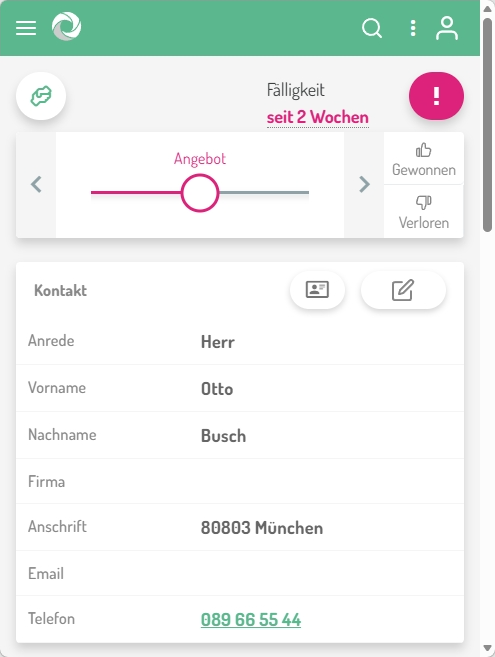
leadtributor forwards each lead within seconds to the matching installer, with full context (customer, product, need, source). The installer sees the lead in the partner portal or via email/push.
- Step 4
Accept, qualify, work the lead
The installer accepts the lead (or hands it back), qualifies the inquiry, logs contact attempts and meetings. Returned leads route automatically to the next partner.
- Step 5
Tracking and reporting
Per installer: lead count, acceptance rate, response time, conversion, deal value. Identify strong and weak partners, and measure the ROI of your lead generation.
Frequently asked questions
What tool do I need to route inbound leads to my installers?
leadtributor is built exactly for this: rule-based distribution of inbound end-customer leads to the right installers by postal code, specialization, and capacity, plus tracking of every lead through to close.
How does postal-code-based routing work?
Each installer is configured with their assigned postal-code areas. When a lead arrives with a postal code, leadtributor automatically forwards it to the responsible partner. Multiple partners per area, round-robin, and capacity-based distribution are supported.
What happens if an installer doesn't accept a lead?
You define a response time (e.g., 24 hours). If the lead isn't accepted within the window, leadtributor automatically reroutes it to the next eligible installer. No lead goes cold.
Can manufacturers see what the installer does with the lead?
Yes. You see per lead whether it was accepted, contacted, qualified, converted into an order, or rejected. Per installer: reports on response time, acceptance rate, and conversion.
How does leadtributor integrate with our CRM?
Via Public API, webhooks, and native connectors (Zapier, n8n). Salesforce, HubSpot, Pipedrive, and other CRMs are synchronized bidirectionally: lead data, activities, and status.
Which industries use leadtributor for installer leads?
Focus is on the energy and building-tech market: photovoltaic and solar manufacturers, heat-pump manufacturers, heating and sanitary (HVAC), plus windows and doors, electrical installation, smart home, and energy management. Anywhere a manufacturer sells through a network of regionally based installers.
Can the installer work the lead from a smartphone?
Yes. The leadtributor partner portal is a PWA that runs on any smartphone or tablet without an app-store install. Installers can accept leads, comment, and set status on the go.
Lead Routing to Installers
Request a demo