
Lead Routing to Field Sales
Inbound appointments to the right field-sales territory
The field-sales reality
Manufacturers with an in-house field-sales team typically sell high-value capital goods or consultation-heavy products: a prefab house, a conservatory, a machine park, a commercial kitchen for a restaurant chain. The purchase process does not run through a web shop or a reseller pipeline; it runs through multiple consultation touchpoints with a rep on the customer site: typically a building consultant at a prefab-home manufacturer, an application consultant at a capital-equipment supplier, a medical sales rep in a clinic.
The problem is not generating leads. The problem is handing them off from marketing to the right rep: who owns the territory, who is available, who has the right specialization for this product segment, who has capacity for a near-term appointment? Manual distribution by spreadsheet or Outlook lists loses half the leads to long response times, and that for products whose lead cost often sits in the high two- or three-digit euro range.
Three things that set field-sales routing apart from channel-partner models
- In-house people, not external partners. No margin model, no channel-conflict politics, no tier negotiations. Lead distribution is an operational allocation problem inside the organization, not a channel-management theme.
- Fixed territory ownership rather than n:m match. A rep owns their territory, typically 1:1 between a postal-code area and a person, in larger territories 1:n with senior and junior reps. Initial assignment is deterministic; complexity comes in through specialization, lead value, and backup rules.
- On-site appointment as the outcome, not online conversion. The rep is not aiming for an online sale; they are aiming for a personal consultation appointment at the customer site. Lead reporting needs to track ‘appointment booked’ as a conversion stage, not ‘lead in pipeline’.
Requirements and how leadtributor solves them
| Requirement | leadtributor solution |
|---|---|
| Territory-based routing | Territory tags per rep (postal-code ranges, regions); routing rules match the customer region from the lead |
| Specialization match | Additional tags per rep (product category, language, senior/junior); tags on the lead drive the match |
| Lead-value thresholds | Lead value as a custom field; routing can send large projects specifically to senior reps |
| Backup rules | Active/paused tag on the rep plus a configured backup; automated non-response escalation catches missed paused tags |
| Appointment tracking | Preferred and agreed appointments as custom fields on the lead. The calendar itself lives in the CRM or Outlook |
| Long sales cycles | Activity and stage documentation across the full cycle; auto follow-up on stall |
| CRM integration | Public API, webhooks, Zapier, n8n. Bidirectional sync with the manufacturer’s CRM (Salesforce, HubSpot, Pipedrive) |
| Reporting | Per rep and territory: response time, appointment rate, close rate, order value |
How this differs from channel-partner models
In a reseller or specialist-dealer channel, the lead recipient sits outside the manufacturer’s organization, with their own margin logic, IT systems, and loyalty model. In the field-sales model the recipient is an in-house employee: no margin negotiation, no separated systems, no channel-conflict risk. From a routing perspective: simpler initial assignment (territory mostly 1:1), clearer backup logic, more direct CRM integration (the manufacturer’s CRM is also the system the rep works in).
What stays the same: the mobile-first pattern (field sales works from the car and at the customer, not in the office), the escalation and auto-follow-up mechanics, the reporting on response and conversion.
Which industries benefit most
Manufacturers with high-value, consultation-heavy products and an in-house field-sales team: prefab-housing and timber-construction makers with a building-consultant network (SchwörerHaus-style), premium-building-product makers like conservatories or premium doors and windows, capital-equipment and B2B machinery suppliers, commercial- and workshop-equipment makers, medical-equipment suppliers serving practices and clinics, smart-building solution providers for commercial real estate.
Next step
See in 30 minutes how leadtributor would look against your field-sales team: with your territory cuts, your specializations, your lead-value thresholds, and the connection to the CRM your reps already work in.
How it works
- Step 1
Aggregate lead sources from marketing
Brand website, performance campaigns, ABM inquiries, trade-show capture, referral forms, phone hotlines. For capital equipment and consultative sales, the lead often carries a lot of pre-sales context already on the form: budget band, project window, preferred consultation format. leadtributor captures all of it as structured custom fields.
- Step 2
Route to the territory-owning rep
Field-sales reps in leadtributor carry territory tags, typically postal-code ranges, regions, or sales territories. Plus product specializations (e.g. premium window systems, conservatories, smart building) and lead-value thresholds (large projects above X euro only to senior reps). Optionally the marketing team reviews the inquiry manually before routing, useful for particularly high-value or sensitive leads.
- Step 3
Lead arrives with appointment context
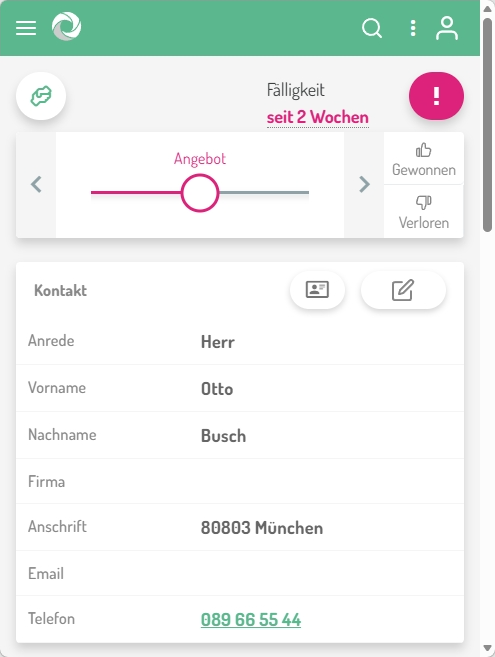
The rep sees the lead in the leadtributor portal: a PWA that runs on any device, smartphone in the car, tablet in the hotel, laptop on the road. With customer contact data, project context, preferred appointment window (if the customer supplied one on the form, captured as a custom field), source attribution. Tap on the phone number starts a call, tap on the address opens the maps app.
- Step 4
Acceptance, appointment booking, consultative sale
The rep accepts or declines with a reason (capacity, wrong specialization, lead value below threshold). On decline, escalation runs: reassign to the next suitable colleague in the territory, or senior escalation. Actual appointment booking with the customer happens afterwards outside leadtributor (Outlook calendar, the rep's CRM tool); the agreed appointment is captured back as a custom field on the lead.
- Step 5
On-site appointment, quote, close, all on the lead
The rep documents appointment outcome, quote, follow-up meetings, and close as lead activities. Per rep and territory you see: response time, appointment rate, close rate, average order value, and can steer marketing budget toward the territories with the best conversion.
Frequently asked questions
How does routing by fixed field-sales territory work?
Each rep is set up with their postal-code ranges or regions as a territory tag, typically a 1:1 mapping (one postal code belongs to one rep), in larger territories 1:n with senior and junior reps. Routing rules match the customer's region from the lead against the tags. Backup rules (vacation, sickness) are expressed with additional tags.
Can the marketing team manually check leads before they go to field sales?
Yes. leadtributor offers an optional pre-qualification step: incoming leads first land in a marketing-internal review inbox, and the marketing or lead-operations team releases them into distribution one by one. Useful for particularly high-value inquiries, unclear quality, or strategically important accounts.
How do we handle leads with a value or project size above a threshold?
Lead value (budget band, estimated project volume) is captured as a custom field on the lead and usable as a routing criterion. Large projects can be routed automatically to senior reps or the key-account team, smaller inquiries to the regular territory owners.
What happens when a rep is on vacation or sick?
Through an active/paused tag on the rep and backup rules in routing: when the primary rep is not active, leadtributor sends the lead to the configured backup. The normal non-response escalation acts as a safety net. Even if a paused tag is missed, the lead reaches someone else after the response window.
How is an on-site appointment with the customer tracked on the lead?
Preferred appointment (if supplied by the customer) and agreed appointment are carried as custom fields on the lead. Actual booking happens in the rep's calendar tool (Outlook, Google Calendar, CRM); leadtributor itself does not maintain a calendar. The appointment value is a date field that anchors sales-cycle tracking.
Does it work for long sales cycles in capital equipment, with multiple touchpoints?
Yes. Activities (meetings, quotes, follow-ups, contract negotiation) are documented by the rep in the portal. If a lead sits without activity for a defined period, leadtributor follows up automatically. Relevant for capital-equipment cycles of 3 to 12 months, in which leads otherwise tend to fall asleep in the pipeline.
How do we connect leadtributor with our CRM for field-sales reporting?
Through public API, webhooks, and connectors via Zapier or n8n. Lead data, stage changes, appointments, and activities flow bidirectionally with your Salesforce, HubSpot, Pipedrive, or similar. Field-sales reporting on your CRM dashboard can be fed directly from the leadtributor data stream.
Lead Routing to Field Sales
Request a demo